Picking the Best Lead Management and CRM Software for 2025
Why Most Businesses Lose Leads Before They Even Get Started
lead management vs crm is one of the most misunderstood distinctions in sales and marketing software heading into 2026 — and getting it wrong is costing businesses real money.
Here’s the quick answer:
| Lead Management | CRM | |
|---|---|---|
| Focus | Pre-sale: capturing and converting new leads | Post-sale: managing customer relationships |
| Primary goal | Speed, qualification, and conversion | Retention, upsell, and lifetime value |
| Who uses it | Sales reps chasing new business | Sales, support, and account teams |
| Timeline | Days to weeks | Months to years |
| Best for | Hunting new customers | Farming existing ones |
They are not the same tool. They solve different problems at different stages of the customer journey.
Here’s the problem most business owners run into: they buy a full CRM expecting it to handle everything — lead capture, follow-up, routing, qualification, and customer retention. But a CRM is built for managing relationships after the sale. When you use it to manage raw, incoming leads, things fall through the cracks.
And the cost of that gap is steep. Research from Harvard Business Review consistently shows that 78% of buyers choose the first company to respond — and responding within five minutes increases conversion chances by as much as 900%. Most businesses are nowhere close to that speed, largely because they’re using the wrong tool for the job.
The good news? Once you understand where lead management ends and CRM begins, the path forward becomes much clearer.
I’m Stephen Sovenyhazy, founder of CORE CONNECT — a boutique digital systems firm based in Charleston, SC — and over the past 20+ years I’ve helped businesses across home services, professional services, healthcare, and more untangle exactly this kind of lead management vs CRM confusion. In this guide, I’ll walk you through the real differences, the right tools for each stage, and how to build a stack that actually works together.
Lead Management vs CRM: Defining the Boundaries
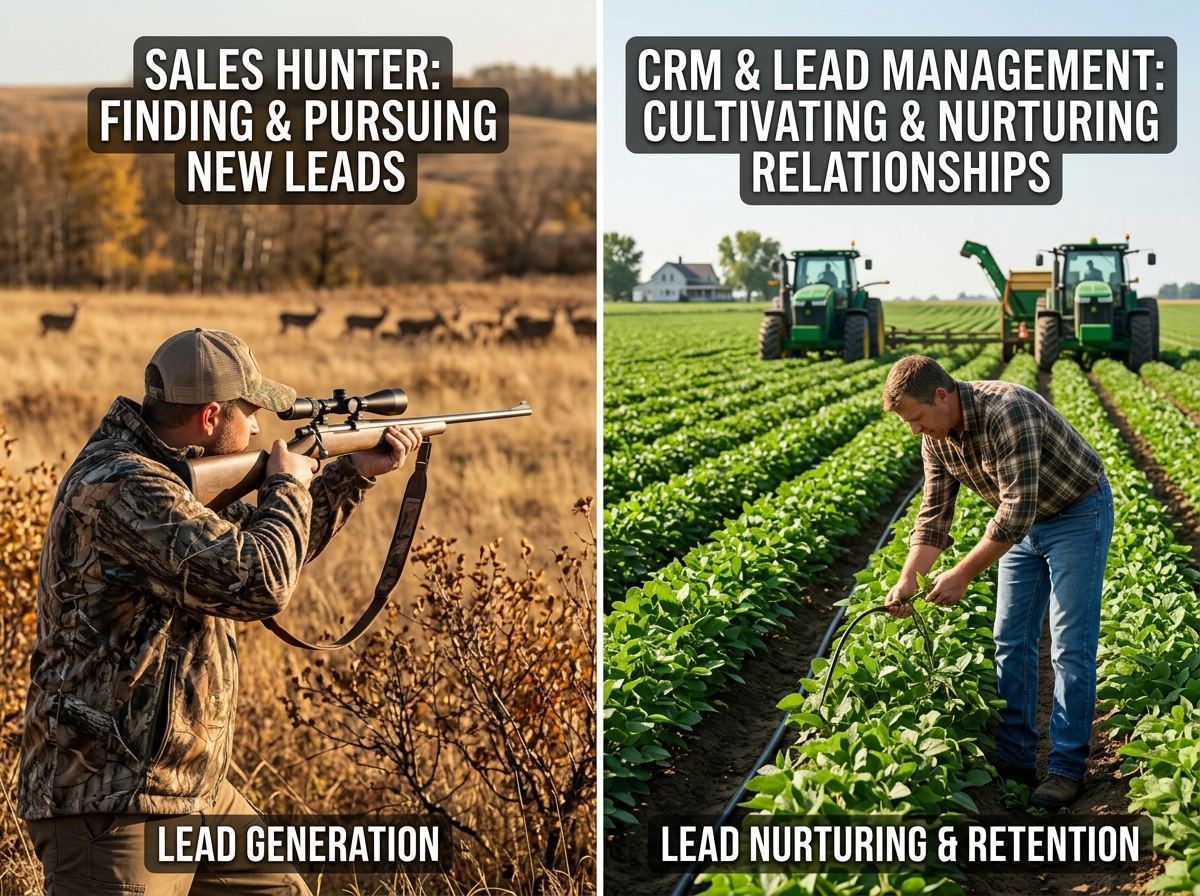
To understand the lead management vs crm debate, we often use the analogy of “hunting vs. farming.”
Lead management is for the hunters. It is a pre-sale process designed to take a “stranger” — someone who just clicked an ad or filled out a form on your website — and turn them into a qualified opportunity. It’s built for speed, high-volume activity, and aggressive follow-up. If you are a Charleston home services company or a real estate agency, your lead management system is what ensures that when a homeowner inquires about a roof repair at 2:00 PM, they are called by 2:05 PM.
CRM is for the farmers. Once that lead becomes a paying customer, they move into the CRM. This platform is your post-sale relationship manager. It stores the history of every conversation, every invoice, and every support ticket. Its job is to help you “farm” that relationship for long-term growth, repeat business, and referrals.
The critical boundary between the two sits at the moment of conversion. Using a CRM to manage raw leads is like trying to use a combine harvester to mow your lawn — it’s expensive, slow, and built for a completely different scale of work. Conversely, using a basic lead management tool to manage long-term clients will leave you with a “graveyard of garbage data” because it lacks the depth needed for relationship building.
Key Features of Modern Lead Management Systems
When we build digital ecosystems for our clients in Mount Pleasant or North Charleston, we emphasize that a lead management system (LMS) must be an active participant in your sales process, not just a digital filing cabinet.
Key features of a dedicated LMS include:
- Multi-Channel Capture: Automatically pulling leads from your website, Facebook ads, Google Local Services Ads, and third-party lead providers.
- Real-Time Lead Routing: Using logic to distribute leads to the right salesperson based on territory, expertise, or “round-robin” availability.
- Lead Scoring: Assigning points to leads based on their behavior (e.g., visiting a pricing page) or demographics (e.g., being in a specific Charleston zip code) so your team knows who to call first.
- Automated Workflows: Sending an immediate “We received your request” text or email so the lead knows they are being prioritized.
For businesses that rely on high-volume lead acquisition, these features are non-negotiable. Without them, you suffer from “lead leakage,” where expensive prospects simply disappear into the void of an unorganized inbox. To see how we build these types of automated foundations, you can explore More info about automation services.
Why Speed-to-Lead is the Core of Lead Management vs CRM
The most significant differentiator in the lead management vs crm discussion is the “speed-to-lead” factor.
In today’s market, buyer behavior has shifted. Most customers are reaching out to multiple companies simultaneously. The “first-responder advantage” is massive: according to data from Forbes, 78% of buyers go with the company that calls them back first. If you wait an hour to respond, your chances of qualifying that lead drop by 10x. If you wait 24 hours? You’ve likely already lost the deal to a competitor in West Ashley or Summerville who was faster.
Lead management systems are built specifically to facilitate this sub-five-minute response time. CRMs, while powerful, often require manual data entry or have delayed syncs that introduce friction. When a 5-minute response can lead to a 900% conversion boost, that friction is a silent killer of ROI.
The Role of CRM in Long-Term Business Growth
While lead management wins the sprint, the CRM wins the marathon. For professional services in Charleston — like law firms, CPAs, or marketing agencies — the CRM is the “single source of truth” for the business.
A CRM’s primary role is to increase Customer Lifetime Value (CLV). Studies by Salesforce show that businesses using a CRM see an average 29% increase in sales revenue after proper implementation. This happens because the system allows you to:
- Track Relationship History: Know exactly what was discussed six months ago before you hop on a renewal call.
- Manage Complex Sales Cycles: For B2B companies in the Lowcountry, sales can take months. A CRM tracks every stage of the deal pipeline.
- Automate Retention: Set triggers to reach out to clients on their anniversary or when they haven’t ordered in 90 days.
- Revenue Forecasting: Use data to predict your “win rate” and future cash flow with high accuracy.
| Feature | Lead Management System | CRM Platform |
|---|---|---|
| Primary User | SDRs / Intake Teams | AEs / Account Managers / Support |
| Data Focus | Contact info + Intent | Full history + Transactions |
| Automation | Immediate routing & follow-up | Nurturing & retention triggers |
| Reporting | Cost per lead / Conversion rate | Forecast accuracy / CLTV |
For those looking to build this long-term authority, our More info about SEO services helps ensure that the “farming” stage is always fed by a steady stream of high-quality organic traffic.
Transitioning Data in the Lead Management vs CRM Workflow
The “handoff” is where most Charleston businesses struggle. When a lead is qualified by your sales development team (the “hunters”) and is ready to become an active opportunity or a customer, the data must move seamlessly.
A broken handoff looks like this: your salesperson has to manually re-type the customer’s info into the CRM, losing the context of the initial conversation. A seamless handoff, which we implement via bi-directional sync, ensures that the moment a lead is marked “Qualified,” an Opportunity is automatically created in the CRM with all previous notes, call recordings, and source attribution intact.
This transition is vital for industries like Charleston tourism or real estate, where the journey from “interested visitor” to “loyal client” involves multiple touchpoints across different teams.
Choosing the Right Stack for Your Charleston Business
At CORE CONNECT, we believe you shouldn’t have to choose between lead management vs crm — you should have a unified operating system that handles both. However, the most important factor is ownership.
Many businesses in the Lowcountry are stuck “renting” their growth on proprietary platforms that they don’t control. We move our clients toward a platform-first approach using the Reveal Marketing Hub. This system acts as a bridge, identifying anonymous website visitors and moving them through a structured lead management process before housing them in a scalable CRM foundation.
By integrating your More info about website design with a unified backend, you gain clarity and control. You no longer have to guess which marketing channel is working; you can see the exact path from a Google search in Daniel Island to a closed contract in your CRM.
Frequently Asked Questions about Lead Management and CRM
Can a CRM replace a lead management system?
Technically, many modern CRMs have lead management features, but they rarely replace a dedicated system for high-volume businesses. CRMs often lack the sophisticated real-time routing, “ping-post” capabilities, and multi-endpoint distribution logic required by lead generation companies or large sales teams. If your business lives and dies by speed-to-lead, a dedicated lead management layer is usually necessary.
When should a small business upgrade to a full CRM?
You should move beyond basic lead tracking to a full CRM when your focus shifts from “how do I get more customers?” to “how do I keep and grow the customers I have?” If you have a growing database of past clients, complex project lifecycles, or a team that needs to share customer history across departments (like sales and support), it’s time for a CRM.
How do these tools improve sales team productivity?
These tools eliminate “administrative drag.” Instead of a salesperson spending half their day manually logging calls or trying to remember who to follow up with, the system tells them exactly who to call and when. By automating the “busy work,” your team can focus on what they do best: building relationships and closing deals.
Conclusion: Building Your Unified Operating System
The lead management vs crm debate isn’t about which tool is better; it’s about which tool is right for the current stage of your customer’s journey. At CORE CONNECT, we specialize in helping Charleston businesses escape the chaos of fragmented tools.
We don’t just give you a login to a software; we build a scalable, data-driven foundation that you own. Whether you are in Mount Pleasant, Summerville, or downtown Charleston, we are here to help you implement a unified operating system that identifies leads, automates follow-up, and drives long-term growth.
Ready to stop the lead leakage and start growing with clarity?
- Schedule a Free Consultation: Book a 30-Minute Discovery Call
- Call Us: +1 (843) 800-2026
- Email Us: hello@coreconnect.com
Let’s build a digital ecosystem that works as hard as you do.