
Reveal
Setup – Customizing Reveal Capture Settings
1. Set the capture settings of the Reveal Pixel
These steps are both configured on your behalf by CORE CONNECT
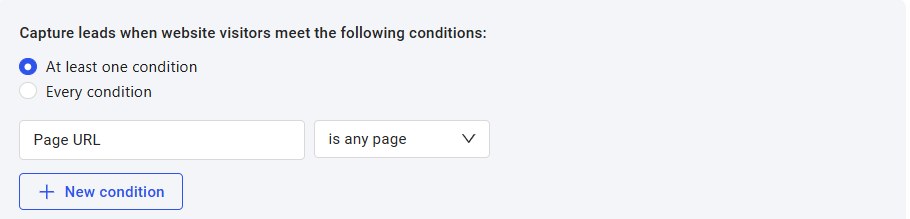
At least one condition will capture leads when ANY of the conditions set is met.
Every condition will capture leads ONLY if ALL conditions set is met.
| CONDITION | OPERATOR | EXAMPLE | |
| PAGE URL | is any Page | captures lead on ALL Pages of the website where the X-Ray Pixel is installed. | captures on any page |
| is | captures lead on a specific Page | captures ONLY on pricing page | |
| is not | captures lead on a ALL Pages except the Page specified | captures on all pages EXCEPT on “jobs” page | |
| contains | captures lead on a ALL Pages that contains the specified URL slug | captures on any page that has the word products on the URL | |
| does not contain | captures lead on a ALL Pages, EXCEPT the Pages that contains the specified URL slug | captures on any page EXCEPT those with the word blog on the URL | |
| starts with | captures lead on Pages that only STARTS WITH the specified URL slug | captures only IF the word app is at the START of the URL. | |
| ends with | captures lead on Pages that only ENDS WITH the specified URL slug | captures only IF the word case-studies is at the END of the URL. | |
| Number of | clicks | captures lead based on the number of clicks (engagement) specified | |
| views | captures lead based on the number of Pages viewed | ||
| Only Returning Visitors | captures returning visitors only | ||
| Time on site is greater than | captures leads based on the time spent on the website (in seconds) |
2. Specify the type of contact data (email address) that Reveal Pixel will capture.

Was this article helpful?