
Stop Drowning in Data with Better Website Analytics and Reporting
Why Most Businesses Struggle with Website Analytics and Reporting
Website analytics and reporting is the practice of collecting, measuring, and interpreting data about how visitors interact with your website—then turning those insights into reports that guide business decisions. It helps you understand who visits your site, how they behave, what converts them into leads or customers, and where you’re losing opportunities.
Quick Overview: What Website Analytics and Reporting Covers
- Traffic Reports – Where visitors come from (search, ads, social, direct)
- Behavior Reports – What pages they view, how long they stay, and where they exit
- Conversion Reports – Which actions lead to sales, sign-ups, or leads
- Retention Reports – How often visitors return and when they stop engaging
- Real-Time Dashboards – Live monitoring of visitor activity and campaign performance
If you’re already running digital ads or investing in SEO, you’ve probably looked at Google Analytics. Maybe you’ve seen traffic grow while conversions stayed flat. Or maybe you’ve noticed a spike in sessions but have no idea which visitors are qualified leads and which are noise.
That disconnect happens because most analytics tools show you what happened, but not why it matters. They report page views, bounce rates, and session durations—but don’t connect those metrics to revenue, pipeline, or the specific people visiting your site.
According to research, businesses using tools like Google Analytics have cut reporting time by 50% and reduced user drop-offs by 9% when they focus on the right data. But those wins only happen when you know what to measure, how to interpret it, and how to act on it.
The problem isn’t a lack of data. It’s too much data without context.
You’re collecting thousands of anonymous sessions, but you can’t identify which companies are visiting, what problems they’re researching, or when they’re ready to buy. You’re tracking metrics that feel important—like bounce rate or time on page—but you’re not sure how they connect to actual business outcomes.
This guide will show you how to move from data overload to actionable insights. You’ll learn which metrics actually matter, how to set up reporting that aligns with business goals, and how to use analytics to drive conversions instead of just tracking them.
I’m Stephen Sovenyhazy, founder of CORE CONNECT, and I’ve spent over 20 years building analytics systems that help businesses turn anonymous traffic into measurable pipeline. Throughout my career, I’ve seen how website analytics and reporting can either clarify growth or create confusion—and the difference comes down to how you collect, interpret, and act on the data.
The Fundamentals of Website Analytics and Reporting
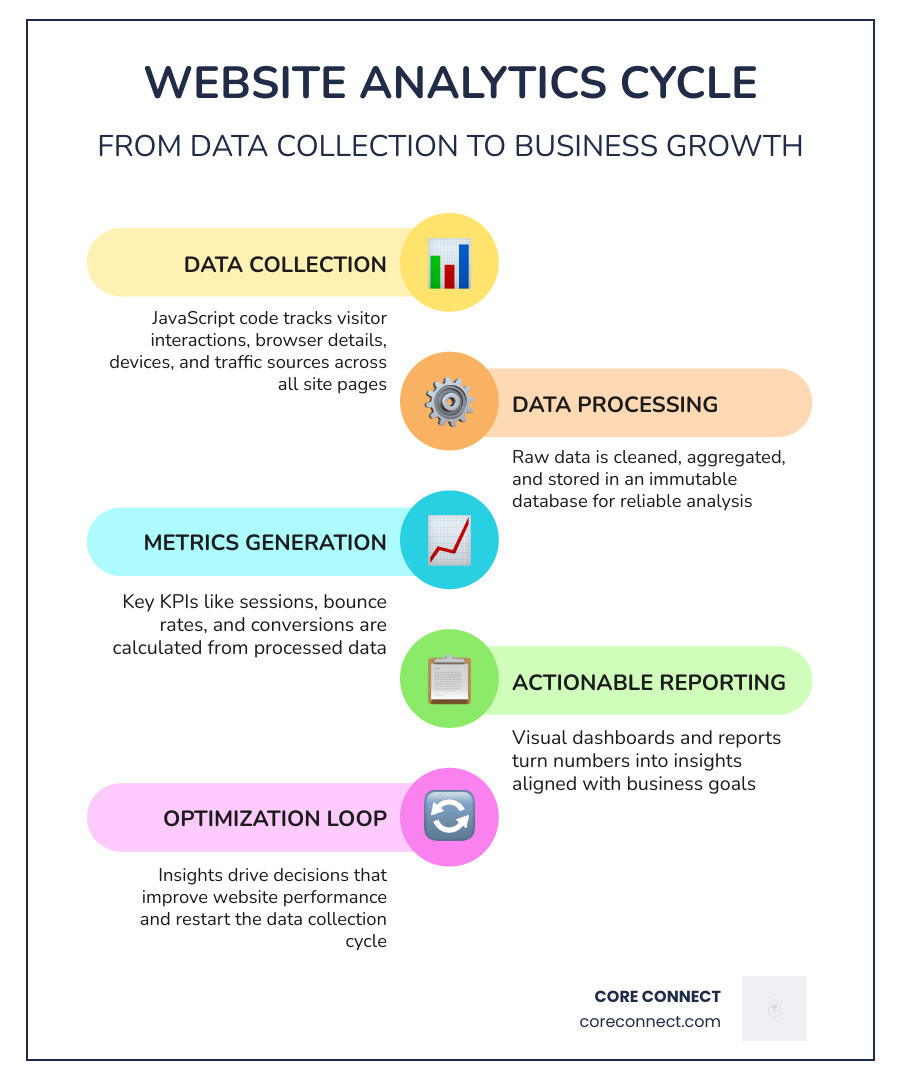
At its core, website analytics and reporting is about visibility. Without it, you are essentially flying blind. We define website analytics as the measurement, collection, analysis, and reporting of web data for purposes of understanding and optimizing web usage.
The process starts with a small piece of JavaScript measurement code added to every page of your site. This code collects pseudonymous information about user interactions, browser details (like language and type), device types, operating systems, and traffic sources. Once this data is collected, it is processed and aggregated into an immutable database. This means once the data is processed, it cannot be changed—making the initial configuration of your tracking vital.

However, many businesses in the Lowcountry find that standard setups don’t tell the whole story. While platforms like Google Analytics are powerful, they often provide “sampled” data or estimates rather than 100% accuracy. This is one reason Why Google Analytics Falls Short for businesses that demand precise, visitor-level intelligence. To get started correctly, you should follow the official Google documentation on setting up Analytics for a website to ensure your base property and data streams are functional.
Why Reporting is Essential for Modern Businesses
Reporting is the bridge between raw numbers and business growth. It isn’t just about looking at a graph once a month; it’s about accountability and informed decision-making. Effective reporting helps us answer critical questions:
- Which marketing channels are actually driving qualified leads?
- Where are users getting stuck in the sales funnel?
- What content resonates most with our target audience in Charleston and Mount Pleasant?
One of the most significant shifts in modern reporting is the move toward Website Visitor Identification. Traditional analytics tell you that “someone” visited from Charleston; visitor identification tells you which company that visitor works for. This transparency allows sales teams to act on real-time intelligence rather than waiting for a contact form to be filled out.
How Website Analytics and Reporting Drive Conversions
Data is the ultimate tool for conversion rate optimization (CRO). By analyzing behavior reports, we can identify friction points. For example, if a “Conversion Report” shows a 20% drop-off on your payment or sign-up page, it suggests a technical glitch or a confusing user interface.
By monitoring user retention and churn rates, we can understand the lifetime value of a customer. We’ve seen businesses achieve a 9% reduction in user drop-offs simply by identifying and fixing these specific “leaks” in the funnel. The Benefits of Website Visitor Identification play a massive role here, as they allow us to see the customer journey from the first anonymous click to the final sale, providing the context needed to optimize every touchpoint.
Key Metrics and Report Types for Business Growth
To scale a business in South Carolina’s competitive markets, you need to know which levers to pull. This requires moving beyond “vanity metrics” (like total page views) and focusing on growth metrics.
One of the most powerful reports we use is the Acquisition Report. This tells us exactly “who’s knocking” at your digital door. For B2B companies, understanding Who’s Knocking? Unmasking Your B2B Website Visitors is the difference between a cold call and a warm, data-backed outreach.
| Traffic Metrics (The “How Many”) | Engagement Metrics (The “How Good”) |
|---|---|
| Total Sessions | Average Session Duration |
| New vs. Returning Users | Pages per Session |
| Traffic Source (Organic, Paid, Social) | Scroll Depth |
| Total Page Views | Conversion Rate |
Essential Website Analytics and Reporting KPIs
Key Performance Indicators (KPIs) should always align with your specific business objectives. If your goal is lead generation, a high bounce rate on a long-form blog post might be acceptable, but a high bounce rate on a landing page is a red flag.
Important KPIs include:
- Sessions: The total number of visits to your site.
- Bounce Rate: The percentage of visitors who leave after viewing only one page.
- Conversion Rate: The percentage of visitors who complete a desired action (e.g., calling your office or filling out a form).
- Average Session Duration: How long people stay on your site, indicating content quality.
For a deeper dive into how these metrics interact with visitor data, check out Website Visitor Identification: The Complete Guide.
Understanding Traffic, Behavior, and Retention Reports
To get a 360-degree view, we look at three specific report types:
- Traffic Reports: These identify the source/medium of your visitors. Are they finding you through a Google search, a Facebook ad, or a direct link? Knowing How to Connect Google Search Console with Google Analytics is vital here, as it allows you to see the exact keywords people typed into Google to find your business.
- Behavior Reports: These show the “User Flow.” You can see the path a visitor takes from your homepage to your service pages. If they all leave after visiting the “About Us” page, you know that page needs more compelling calls-to-action.
- Retention Reports: These use cohort analysis to see if people come back. In industries with long sales cycles, retention is often more important than initial acquisition.
Implementing a Data-Driven Strategy
Setting up a framework for website analytics and reporting requires more than just pasting a code snippet. It requires a strategy that respects data privacy while maximizing insight.
In today’s regulatory environment, compliance with GDPR and CCPA is non-negotiable. While these are often associated with Europe and California, their principles of data ownership and privacy affect how we collect data globally. Tools like Plausible offer a privacy-friendly, lightweight alternative for those who want to avoid the complexities of “big tech” tracking. You can learn more in the Plausible Analytics documentation. However, for businesses that need aggressive growth, understanding the trade-offs in Website Visitor Identification vs Analytics Tools is essential to choosing the right stack.
Choosing and Setting Up the Right Analytics Framework
When we build an analytics framework, we typically use a combination of tools:
- Google Tag Manager (GTM): A tag management system that allows you to update measurement codes without touching the website’s backend.
- Measurement ID: The unique identifier that links your website’s data stream to your analytics property.
- Google Search Console: Essential for SEO health. Understanding Google Search Console vs Google Analytics: 10 Differences You Need to Know helps you distinguish between “search intent” data and “on-site behavior” data.
We prioritize data ownership and security, often looking for solutions that meet ISO 27001 standards to ensure your business and customer data remains protected.
Best Practices for Effective Reporting and Interpretation
To prevent “drowning in data,” follow these best practices:
- Establish a Reporting Schedule: Whether it’s weekly for marketing teams or monthly for executives, consistency is key.
- Visualize Data Effectively: Use charts and dashboards that highlight trends over time rather than isolated numbers. A 10% drop in traffic sounds bad, but if it’s a seasonal trend for your industry in the Lowcountry, it might be normal.
- Segmentation: Don’t look at all visitors as one group. Segment them by location, device, or traffic source to find “pockets” of high-performing users.
- Predictive Analytics: Use modern AI-driven insights to anticipate future growth opportunities based on historical patterns.
- Attribution Modeling: Determine which touchpoints (e.g., the first social ad or the final search) deserve credit for the conversion.
Frequently Asked Questions about Website Analytics
What is the difference between website analytics and visitor identification?
Website analytics (like Google Analytics) provides aggregated, pseudonymous data about what is happening on your site (e.g., “100 people visited the pricing page”). Visitor identification (like our Reveal Marketing Hub) provides specific intelligence on who is visiting (e.g., “A marketing manager from a local Charleston law firm spent 5 minutes on your pricing page”). Analytics is for broad trends; identification is for sales-ready intelligence.
How does data privacy (GDPR/CCPA) impact my reporting choices?
Data privacy laws require businesses to be transparent about what they collect and give users control over their data. This has led to the rise of “cookieless” tracking and privacy-first tools. For businesses in South Carolina, it means ensuring your analytics setup includes a clear privacy policy and, where necessary, consent management tools to stay compliant while still gathering necessary insights.
What are the most common mistakes in website reporting?
The biggest mistake is focusing on “vanity metrics” like total hits rather than conversion-focused KPIs. Other common errors include:
- Not filtering out internal traffic (your own employees’ visits).
- Failing to set up “Goals” or “Conversions” in your analytics tool.
- Ignoring the “why” behind the data—reporting numbers without providing actionable insights.
- Over-complicating dashboards so that no one actually reads them.
Conclusion
At CORE CONNECT, we believe that website analytics and reporting should be the engine of your business growth, not a source of confusion. Based in Charleston, we help businesses across the Lowcountry move beyond basic tracking to achieve real-time visitor intelligence.
Our Reveal Marketing Hub is at the center of this mission. It unifies your CRM, pipeline tracking, and analytics into a single dashboard. By combining conversion-focused website design with search visibility and visitor-level data, we enable you to see exactly where your leads are coming from and how they contribute to your revenue.
Whether you want us to manage everything for you or you want to use the Reveal Marketing Hub to run your own in-house marketing with professional-grade tools, we provide the clarity and control you need to scale.
Ready to stop guessing and start growing? Explore our Services: Website Visitor Identification for Business Growth or learn how to Scale your business with clarity and control using our integrated growth platform.