Time Travel for Social Media: A Guide to Facebook Scheduling
Why Facebook Post Scheduling Costs You Hours — and How to Fix It Fast
Facebook post scheduling is the practice of writing your Facebook content in advance and setting it to publish automatically at a future date and time — so you’re not chained to your phone every day.
Here’s how to schedule a Facebook post in 3 steps:
- Open Meta Business Suite on desktop (or the Facebook app on mobile for Pages and professional profiles)
- Create your post, then click or tap Schedule instead of publishing immediately
- Set your date and time — anywhere from 20 minutes to 29 days in advance — and confirm
That’s it. Your post publishes automatically, even while you’re on a job site, in a client meeting, or closing a deal.
Most business owners already know they should be posting on Facebook consistently. The problem isn’t motivation — it’s time. About 48% of social media marketers say they rarely have enough hours in the day to get their work done. For a business owner juggling customers, staff, and operations, carving out time to post daily is simply unrealistic.
The good news: scheduling solves that problem. You batch your content once, set it, and let it run.
I’m Stephen Sovenyhazy, founder of CORE CONNECT — a boutique digital marketing firm based in Charleston, SC, with over 20 years of experience building automated marketing systems for service businesses. I’ve helped businesses across Charleston and the Lowcountry implement facebook post scheduling as part of a larger, fully owned digital ecosystem that generates leads without requiring daily manual effort.
Why Facebook Post Scheduling is a Game-Changer for Charleston Businesses
For a small business owner on King Street or a contractor serving Mount Pleasant, digital “presence” often feels like a second full-time job. However, facebook post scheduling isn’t just a convenience; it’s a strategic necessity. When you schedule content, you send consistent signals to the Facebook algorithm. The algorithm rewards Pages that post regularly with better organic reach, helping you stay top-of-mind for local customers.
By batching your content—creating a week or a month of posts in one sitting—you maintain brand consistency. You aren’t rushing to post a blurry photo with a typo because you realized you haven’t posted in four days. Instead, you can align your social media with your broader marketing automation services to ensure every post serves a purpose, whether that’s educating a homeowner in West Ashley or inspiring a bride-to-be on Sullivan’s Island.
According to the Meta Business Help Center, native scheduling allows you to plan your presence across both Facebook and Instagram simultaneously. This unified approach is the first step toward moving away from fragmented, chaotic marketing and toward a streamlined operating system for your business.
Step-by-Step facebook post scheduling on Desktop
The most robust way to manage your schedule is through the Meta Business Suite on your computer. This is where you get the “big picture” view of your content calendar.
- Access the Suite: Log in to your Facebook account and navigate to Meta Business Suite from the left-hand menu of your Page.
- Open the Planner: Click on “Planner” in the sidebar. This gives you a visual grid of your past and future posts.
- Create Post: Click the “Create” button. Here, you can choose to post to your Facebook Page, your Instagram account, or both.
- Craft Your Content: Add your text, images, or video. You can even add a feeling/activity or a location tag (like “Charleston, South Carolina”) to boost local relevance.
- Set the Time: Look for “Scheduling Options.” Toggle the “Set date and time” switch.
- The Scheduling Window: You must select a time at least 20 minutes in the future, and you can schedule up to 29 days in advance natively.
- Schedule: Once you’ve picked the perfect slot, hit “Schedule.”
Mobile facebook post scheduling for On-the-Go Creators
If you’re out in the field in Summerville or at a job site in the Lowcountry, you can still manage your schedule directly from your phone. Meta has made this feature available for Pages and personal profiles that have Professional Mode enabled.
- Create Your Post: Start a new post as you normally would on the Facebook app.
- Tap Next: Once your content is ready, tap “Next” to see the “Post settings” screen.
- Scheduling Options: Select “Schedule for later.”
- Recommended Times: One of the best features of the mobile app is that it often suggests “Recommended times.” These are based on when your specific followers are most active on the platform. Choosing these peaks can significantly increase your initial engagement.
- Confirm: Tap “Schedule” and your post is locked in.
Mastering Content Types and Advanced Management
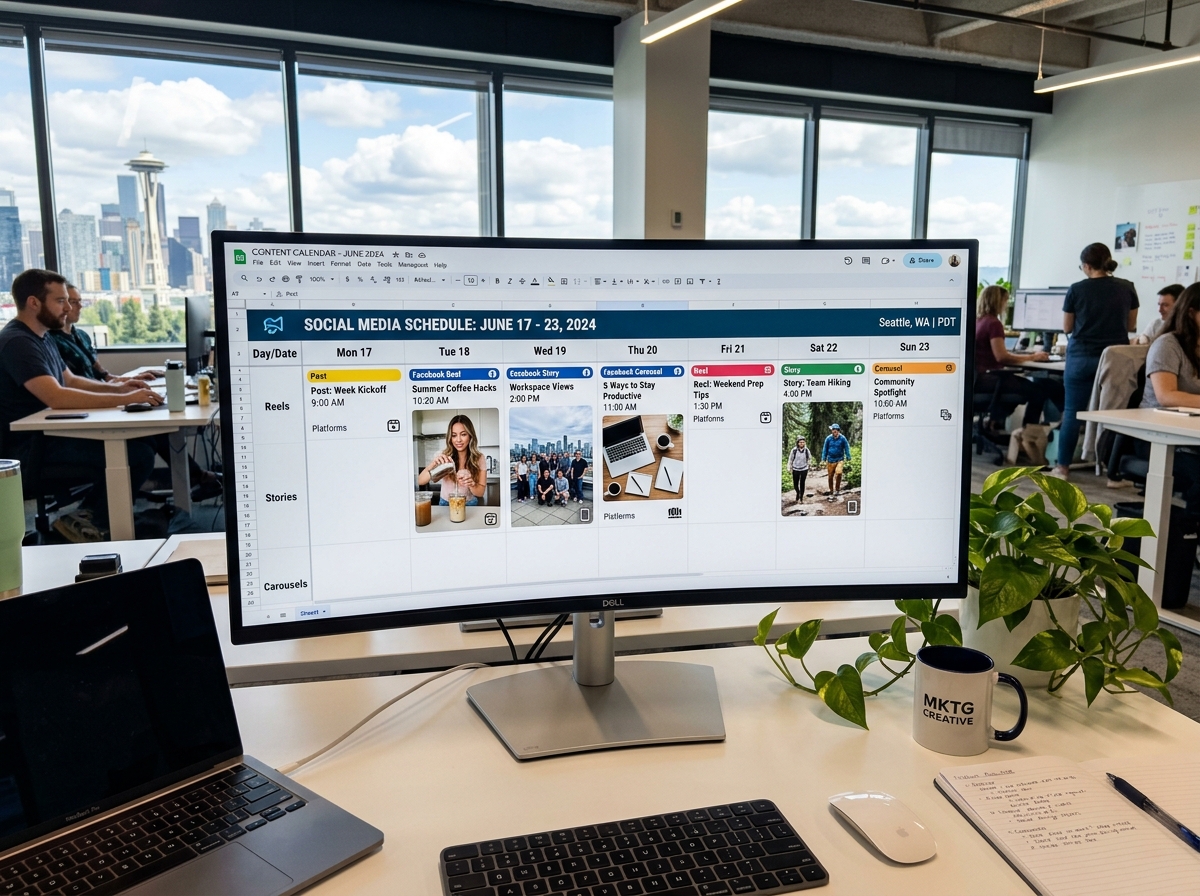
Successful facebook post scheduling involves more than just text updates. To truly engage a Charleston audience, you need a variety of content formats.
- Video and Reels: You can schedule Reels and standard videos through the Meta Business Suite. Given that video content often sees higher engagement than static images, scheduling these ensures you have a steady stream of “sticky” content.
- Stories: While Stories are meant to be “in the moment,” you can schedule them in advance to maintain a consistent presence at the top of your followers’ feeds.
- Carousels and Multi-photo Posts: For real estate agents in Daniel Island showing off a new listing or a restaurant in North Charleston debuting a new menu, carousels are vital. On paid plans with certain third-party tools, you can schedule up to 10 photos in a single post.
Managing Your Queue
What happens if your plans change? Perhaps a local event is canceled, or you have a flash sale you need to prioritize.
- Editing: In Meta Business Suite, you can navigate to your “Scheduled Posts” section. While some mobile versions require you to delete and recreate a post to change the media, the desktop version allows you to edit the text and reschedule the timing easily.
- Rescheduling/Deleting: If you realize you’ve over-scheduled, you can select any post in your planner to move it to a different day or delete it entirely.
At CORE CONNECT, we believe social media is just one part of your digital foundation. To see how these posts feed into a larger lead-generation system, Learn more about Reveal Marketing Hub.
Navigating the Complexity of Groups, Profiles, and Third-Party Tools
While Meta’s native tools are powerful, they do have limitations, especially regarding API restrictions.
Personal Profiles vs. Pages:
Native scheduling is primarily designed for Business Pages and Profiles in Professional Mode. If you are trying to schedule to a standard personal profile, you may find the options missing.
Facebook Groups:
Scheduling to Groups is possible, but it often works differently. If you use a third-party tool, you might encounter “Notification Publishing.” This means the tool can’t “force” the post onto the Group due to Facebook’s privacy rules. Instead, the tool sends a notification to your phone at the scheduled time, and you simply hit “Publish” to finalize it.
The Power of a Unified Dashboard:
For businesses managing multiple locations—say, one in Charleston and another in Greenville—using a unified dashboard is a lifesaver.
- Cross-Posting: You can create one post and schedule it to go live on Facebook, Instagram, and even LinkedIn simultaneously, customized for each platform’s audience.
- Bulk Scheduling: Some advanced tools allow you to upload a spreadsheet of 50+ posts at once, populating your calendar for the next three months in seconds.
Troubleshooting and Best Practices for Maximum Engagement
Even with the best plan, facebook post scheduling can hit a snag. Here is how to keep your automation running smoothly:
- Watch for Token Expiry: If you change your Facebook password, any third-party tools you use will lose their connection (the “token” expires). You’ll need to re-link the account to resume scheduling.
- The 80/20 Rule: We recommend that 80% of your scheduled content should be interactive, educational, or inspiring (like tips on Lowcountry home maintenance), while only 20% should be a direct “ask” or sales pitch.
- Balance Scheduled vs. Live: Don’t let your Page become a ghost town of automated posts. If something exciting happens at your Sullivan’s Island storefront, post it live! Authentic, “right now” content balances the polished feel of scheduled posts.
- Check Your Reach: As noted in research on organic Facebook reach, reach has declined over the years. Scheduling helps combat this by ensuring you never miss an “optimal” window when your audience is online.
Native vs. Third-Party Scheduling
| Feature | Meta Business Suite (Native) | Third-Party Tools |
|---|---|---|
| Cost | Free | Varies (Subscription) |
| Scheduling Window | 20 mins to 29 days | Months or Years |
| Cross-Platform | FB and IG only | FB, IG, LI, X, TikTok, etc. |
| Bulk Upload | Limited | Robust |
| Best Time AI | Basic | Advanced |
Frequently Asked Questions about facebook post scheduling
How far in advance can I schedule a Facebook post?
Using Meta’s native tools, you can schedule posts between 20 minutes and 29 days in advance. If you need to plan further out—perhaps for an annual festival in Isle of Palms—you will need to use a third-party tool which often allows scheduling months or even years ahead.
Why did my scheduled Facebook post fail to publish?
The most common reasons include:
- Expired Permissions: Your account needs to be re-authenticated.
- Connectivity Issues: A temporary glitch in Meta’s API.
- Media Violations: The image or video violated Facebook’s community standards and was flagged before publishing.
- Role Changes: If your “Task Access” or admin permissions were changed, the scheduled post may fail.
Can I schedule posts to a Facebook Group I manage?
Yes. Within the Group itself, you can use the native “Schedule” icon (the little clock) when creating a post. If you are using an external tool, ensure you have added that tool to the “Apps” section in your Group Settings to grant it permission to post on your behalf.
Conclusion
At CORE CONNECT, we don’t just want you to post more; we want you to post smarter. By mastering facebook post scheduling, you reclaim your time and build a consistent brand that resonates with the Charleston community. But social media is just one piece of the puzzle.
Our mission is to help small and medium-sized businesses in the Lowcountry move away from fragmented tools and toward an integrated digital ecosystem. With our platform-first approach and tools like the Reveal Marketing Hub, we help you own your data and automate your growth.
Stop living in the chaos of disconnected marketing. Whether you’re in West Ashley, Mount Pleasant, or downtown Charleston, let’s build a scalable foundation for your business.
Ready to stop the social media time-sink and start growing?
Get Your Free Digital Audit
Contact Us:
Phone: +1 (843) 800-2026
Email: hello@coreconnect.com
Web: coreconnect.com