Why Mobile Friendly Website Design Is No Longer Optional
Mobile friendly website design is the practice of creating websites that automatically adapt to smaller screens, load quickly, and provide seamless navigation for users on smartphones and tablets. It combines responsive layouts, optimized images, touch-friendly buttons, and simplified navigation to ensure every visitor gets a fast, frustration-free experience—no matter what device they’re using.
Key elements of mobile friendly website design include:
- Responsive layouts that adjust to any screen size using flexible grids and CSS media queries
- Fast load times through image compression, reduced HTTP requests, and optimized code
- Touch-friendly navigation with large tap targets (minimum 44×44 pixels) and simplified menus
- Readable typography with font sizes of at least 16px and adequate line spacing
- Mobile-first indexing compatibility so Google ranks your site based on its mobile version
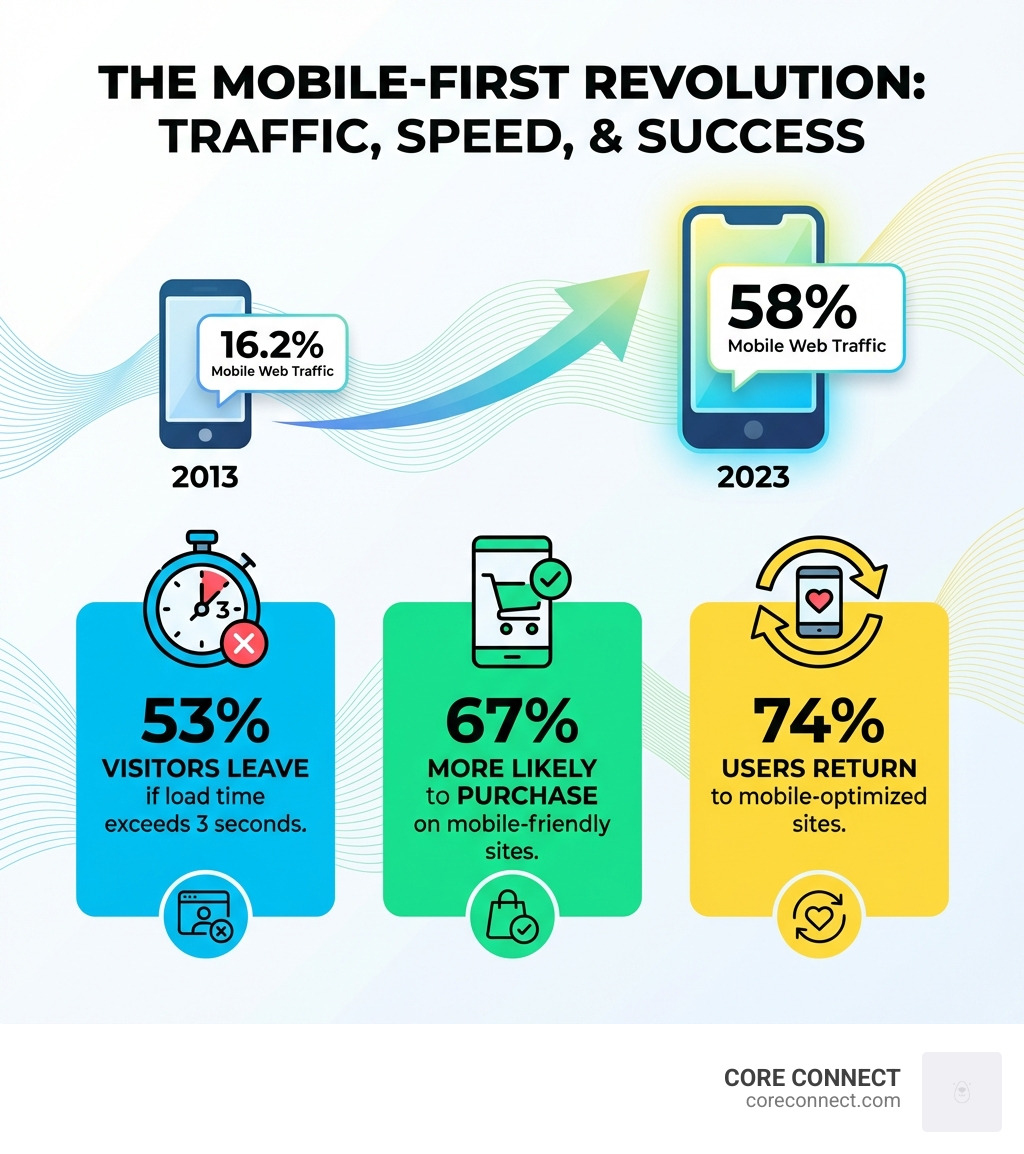
If you’re reading this on your phone right now, you’re part of a massive shift. Over 58% of all web traffic now comes from smartphones and tablets. That number was just 16.2% a decade ago. Mobile traffic has more than tripled, and it’s still climbing.
But here’s the problem: most websites weren’t built for this reality.
They were designed for desktop screens, then squeezed down to fit phones. The result? Tiny text you have to pinch and zoom. Buttons that are impossible to tap. Pages that take forever to load. And worst of all—53% of mobile visitors leave if a page takes longer than 3 seconds to load.
That’s not just bad user experience. It’s lost revenue.
Google knows this. That’s why they’ve been using mobile-first indexing since 2019. They don’t look at your desktop site first anymore. They rank you based on how well your mobile version performs. If your mobile site is slow, clunky, or hard to steer, your search rankings suffer—no matter how good your desktop version looks.
The stakes are clear. Customers are 67% more likely to buy from a mobile-friendly site. Companies that prioritized mobile-first design saw sales increases of 68%. And 74% of users will return to a site if it works well on their phone.
This isn’t about keeping up with trends. It’s about meeting your customers where they already are.
I’m Stephen Sovenyhazy, founder of CORE CONNECT, and I’ve spent over 20 years building and scaling digital platforms for businesses across healthcare, professional services, and local trades. I’ve helped companies increase organic traffic by 100–300% by implementing mobile friendly website design strategies that prioritize speed, usability, and conversion-focused architecture. In this guide, I’ll walk you through exactly how to create a mobile experience that doesn’t just work—it converts.
The Core Principles of Mobile Friendly Website Design
When we talk about mobile friendly website design, we aren’t just talking about a “shrunken down” version of your desktop site. True mobile friendliness is a design strategy that responds to users’ needs and their devices’ capabilities. It’s about creating an experience that feels natural on a 6-inch screen.
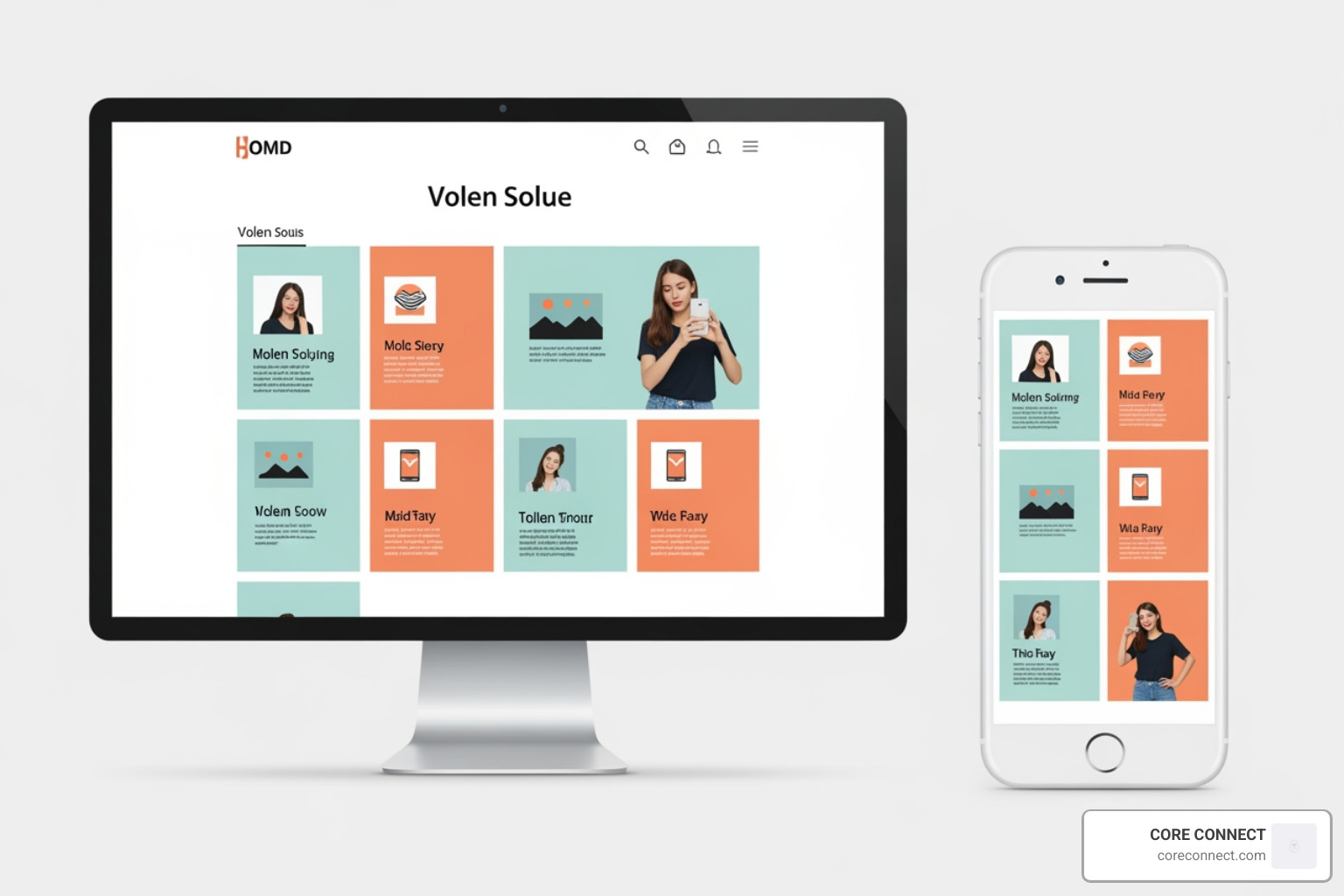
The foundation of this is responsive web design. This approach uses fluid grids, flexible images, and CSS media queries to ensure your content reflows based on the screen size. As A List Apart first defined it, responsive design allows a single website to serve everyone, whether they are on a massive iMac in Mount Pleasant or an iPhone in downtown Charleston.
To get this right, we focus on a few “non-negotiable” principles:
- Fluid Grids: Instead of designing in fixed pixels (like 1200px wide), we use percentages. This ensures that if a screen is 400px wide, the content fills 100% of that space without horizontal scrolling.
- Vertical Hierarchy: On desktop, we have plenty of horizontal “real estate.” On mobile, we have a narrow vertical strip. We must stack content strategically, putting the most important information—like your phone number or primary offer—at the very top.
- Visual Breathing Room (White Space): Mobile screens are small. If you clutter them with too many images or blocks of text, users get overwhelmed. We use white space to separate elements, making it easier for the eye to scan and the thumb to tap.
Mobile vs. Desktop: The Key Differences
| Feature | Desktop Design | Mobile Friendly Design |
|---|---|---|
| Screen Space | Large, horizontal | Small, vertical |
| Navigation | Visible top/side menus | Hidden (Hamburger) menus |
| Interaction | Precise mouse clicks | Broad thumb taps |
| Context | Focused, stationary | Distracted, on-the-go |
| Connectivity | High-speed, stable | Variable (4G/5G/Public Wi-Fi) |
Why Mobile-First Indexing is the New Standard
For years, Google used the desktop version of a site to determine where it should rank. Those days are gone. With mobile-first indexing, Google’s “Googlebot smartphone” is the primary crawler. It looks at your mobile site first to judge your relevance and quality.
This shift happened because there are now more search queries on mobile devices than on desktop. If your mobile site doesn’t pass Google’s “Mobile-Friendly Test,” your search visibility in the Lowcountry and beyond will take a hit. High search rankings lead to increased brand awareness, which ultimately drives sales growth. If you ignore the mobile experience, you aren’t just annoying users—you’re hiding from them.
Best Practices for Optimizing Mobile Performance and UX
Performance is the heartbeat of a mobile friendly website design. You can have the most beautiful site in South Carolina, but if it takes 10 seconds to load on a 5G connection, no one will ever see it.
Speed is Your Secret Weapon
According to research by Google, the bounce rate increases dramatically for every second your site takes to load. To stay under the crucial 3-second rule, we implement several technical optimizations:
- Image Compression: High-resolution photos are the #1 cause of slow mobile sites. We use modern formats like WebP or AVIF, which offer superior compression without losing quality.
- Reducing HTTP Requests: Every script, font, and image requires a “request” to the server. By combining files and stripping away unnecessary plugins, we make the site leaner and faster.
- Lazy Loading: This tells the browser to only load images as the user scrolls down to them. This speeds up the initial page load significantly.
Readability and Accessibility
If a user has to squint or pinch-to-zoom, you’ve already lost. For a mobile friendly website design, we recommend a minimum font size of 16px for body text. Anything smaller is a strain on the eyes. We also aim for a line height of 1.5 to prevent lines of text from overlapping.
Accessibility isn’t just a “nice to have”—it’s essential. This means using high color contrast so text is readable in bright sunlight (common here in the Lowcountry!) and providing alt text for images so screen readers can interpret your content for visually impaired users.
Simplifying Navigation for a Mobile Friendly Website Design
Mobile users are often in a hurry. They want to find your address, your services, or your “Book Now” button immediately. Complex desktop menus don’t work here.
- The Hamburger Menu: This three-line icon is the universal symbol for “more.” It saves space while keeping your site organized.
- Quick Action Bar: For local businesses, a sticky bar at the bottom of the screen with “Call,” “Directions,” and “Email” buttons can skyrocket conversions.
- Back-to-Top Button: Since mobile pages are often long vertical scrolls, a “Back to Top” button helps users steer back to the menu without endless swiping.
- Logo Home Link: It’s a standard expectation—clicking your logo should always take the user back to the homepage.
If you’re looking for more ways to streamline your site, check out our website design services to see how we build these features into every project.
Mastering Touch Targets and CTAs in Mobile Friendly Website Design
We’ve all experienced the frustration of “fat finger syndrome”—trying to click a tiny link and hitting the wrong one instead. To prevent this, every button and link must be an easy-to-hit “touch target.”
Apple and Google both recommend a minimum touch target size of 44×44 pixels. Furthermore, these buttons should have enough padding around them so they don’t crowd other links.
Your Call to Action (CTA) needs to be “spotable” within two seconds of landing on the page. We also advise against intrusive pop-ups (interstitials). Google actually penalizes sites that use large pop-ups that block the main content on mobile, as they ruin the user experience. Instead, use subtle banners or in-line CTAs that don’t interrupt the user’s flow.
Testing and Future-Proofing Your Mobile Presence
Designing for mobile is not a “set it and forget it” task. Devices are constantly evolving—from the latest iPhone to new foldable screens.
How to Test Your Site
You don’t need to buy 50 different phones to see if your site works. We use professional tools to simulate different environments:
- Chrome DevTools: Built right into your browser, this allows you to toggle “Device Mode” and see how your site looks on dozens of different screen sizes.
- BrowserStack: This tool lets you test your site on actual physical devices remotely, ensuring that “real world” bugs are caught early.
- Google Mobile-Friendly Test: This is the ultimate “pass/fail” grade from Google itself. If this tool says your page isn’t mobile-friendly, you need to fix it immediately to protect your rankings.
Looking Toward the Future
The world of mobile design is moving toward Progressive Web Apps (PWAs). These are websites that look and feel like mobile apps, offering offline capabilities and push notifications without requiring a download from an app store. We’re also seeing a rise in AI personalization, where the mobile site layout might change based on a user’s past behavior or location.
Avoid common mistakes like “squished” content (where images are forced into tiny boxes) or horizontal scrolling. If a user has to scroll left or right to see your whole page, your mobile friendly website design has failed.
Frequently Asked Questions about Mobile Design
What are the most common mistakes to avoid in mobile design?
The biggest offenders are small fonts (under 12px), tiny buttons that lead to mis-clicks, and intrusive pop-ups that are impossible to close on a small screen. Additionally, slow loading times and using outdated technology like Flash (which doesn’t work on most phones) will kill your engagement. Finally, unoptimized images that eat up a user’s data plan and slow the site down are a major red flag.
How can businesses test their website’s mobile responsiveness?
Start with Chrome DevTools for a quick check. For a more robust audit, use BrowserStack to see your site on real hardware. We also recommend running a Lighthouse audit (available in Chrome) to get a score on performance, accessibility, and SEO. Don’t forget Google Search Console, which will send you alerts if it detects mobile usability issues on your site.
What are the benefits of responsive design over separate mobile URLs?
In the past, people used “m.website.com” for mobile. This is now discouraged. A single responsive URL is much better for SEO because all your “link juice” goes to one place. It’s also easier to maintain (you only update content once) and provides a consistent brand experience across all devices. Google officially recommends responsive design for these very reasons.
Conclusion: Scale Your Business with CORE CONNECT
Building a mobile friendly website design isn’t just a technical hurdle; it’s a foundational part of your business growth. When your customers are browsing while waiting in line at a coffee shop in Mount Pleasant or riding the bus in Charleston, your digital presence must be “thumb-stopping.”
At CORE CONNECT, we specialize in this kind of high-impact design. We are a Charleston-based growth platform that combines conversion-focused website design with real-time visitor intelligence. We don’t just build sites that look pretty; we build systems that scale.
Through our Reveal Marketing Hub, we provide the visibility you need to see exactly who is visiting your mobile site and what actions they take. Whether you need fully managed services or the tools to run your marketing in-house, we help you turn anonymous mobile traffic into usable sales insight.
Ready to turn your website into a mobile powerhouse? Scale your business with CORE CONNECT and let’s build a system that drives real revenue with clarity and control.