
Why First Impressions Define Digital Success
User friendly website design is about making websites that people can actually use-without confusion, delay, or frustration. Here’s what matters most:
- Intuitive navigation that helps users find what they need in seconds
- Fast loading speeds (under 3 seconds) to prevent abandonment
- Mobile responsiveness that works seamlessly across all devices
- Clear visual hierarchy that guides attention to key information
- Accessible features for users with disabilities
- Simple, scannable content that respects how people actually read online
- Consistent design elements that build trust and recognition
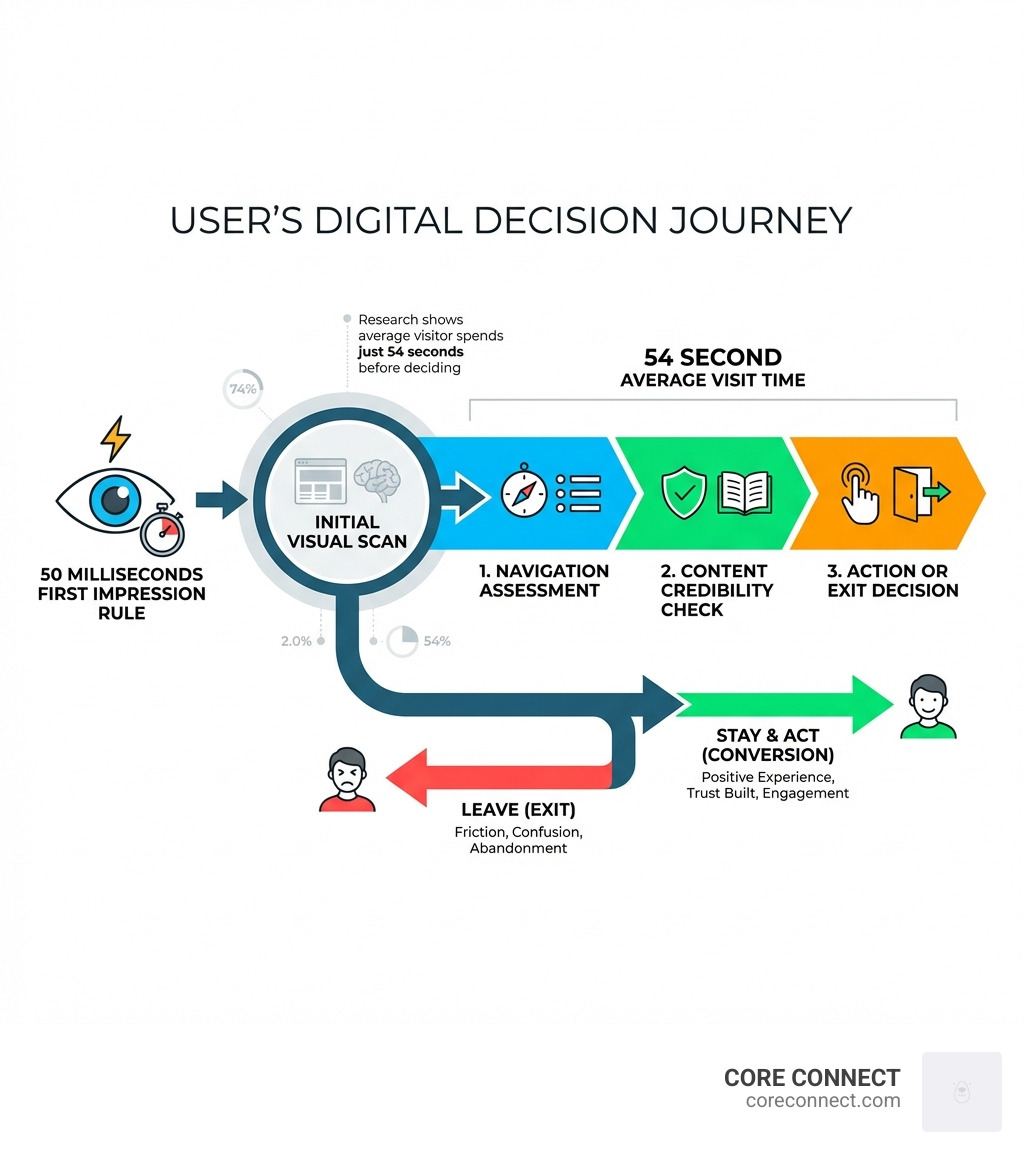
Your website has 50 milliseconds to make a first impression. That’s less time than it takes to blink. Research shows the average visitor spends just 54 seconds on a site before deciding whether to stay or leave. In that narrow window, your design either builds trust or creates friction.
The stakes are higher than ever. 32% of customers would stop doing business with a brand they love after just one bad experience. Another 75% of consumers will abandon a purchase if they don’t trust how their data is handled. These aren’t just usability problems-they’re revenue problems.
Most businesses already know their website matters. They’re investing in ads, SEO, and content. But when the site itself creates barriers-unclear navigation, slow load times, broken mobile experiences-all that effort gets wasted. Traffic arrives, but conversions don’t follow. The website becomes a bottleneck instead of an asset.
I’m Stephen Sovenyhazy, founder of CORE CONNECT, and I’ve spent over 20 years building and optimizing websites across healthcare, professional services, and local trades. My work focuses on creating User friendly website design systems that turn websites into reliable growth engines-not just digital brochures.
Defining User Friendly Website Design in the Modern Era
In the early days of the web, “user-friendly” just meant the site didn’t crash your browser. Today, the bar is much higher. We define User friendly website design as a strategic approach that prioritizes the user’s needs, goals, and limitations above all else. It is the intersection of high-end aesthetics and effortless utility.
We often see businesses fall into the trap of “pretty over practical.” A website can be visually stunning, but if a visitor can’t find your phone number or understand what you actually do within five seconds, it’s a failure. Conversely, a purely functional site that looks like it was built in 1998 will struggle to build the credibility needed to close a sale.
According to Forbes, 61% of users expect to find the correct information on a website within five seconds. If they don’t, they leave. This is why 32% of customers would stop doing business with a brand they loved after just one bad experience. In a competitive market like Charleston or Mount Pleasant, your neighbors are only one click away from your competitor.
The Business Impact of Frictionless Design
Why should a business owner in the Lowcountry care about “friction”? Because friction is a silent profit killer. When we talk about website design services, we aren’t just talking about colors and fonts; we are talking about revenue efficiency.
- Conversion Efficiency: A user-friendly site guides a visitor toward a goal (like a lead form or a purchase) with zero hesitation. Every “question mark” in a user’s mind is an opportunity for them to hit the back button.
- Retention and Switching Risk: If your site is hard to use, you are essentially inviting your customers to see if the “other guy” has a better experience.
- Trust and Privacy: Trust is a hard barrier to entry. Research shows that over 75% of consumers will simply walk away from a purchase if they don’t trust an organization with their data. A professional, user-friendly design signals that you are a legitimate, secure business.
- Support Costs: When a website is intuitive, users can solve their own problems. Since 73% of consumers want the ability to solve issues on their own, a clear design reduces the number of frustrated phone calls and support tickets your team has to handle.
Core Principles of Visual Hierarchy and Consistency
We’ve all landed on a website that felt “busy.” Your eyes dart around, unsure where to look first. That is a failure of visual hierarchy. Visual hierarchy is the practice of arranging elements to imply importance. It tells the user, “Look at this first, then this, then do that.”
Eye-tracking research has shown that the most popular pattern being in the shape of an F. Most users read in a horizontal movement across the upper part of the page, then move down and scan horizontally again. We use this knowledge to place your most important messages—your value proposition and your primary Call to Action (CTA)—exactly where the eye naturally lands.
Another vital element is white space (or “negative space”). It’s tempting to fill every inch of a screen with information, but white space is what allows the brain to process that information. It reduces cognitive load and makes the “recognition” of your brand much faster.
User-Friendly vs. Poorly Designed Websites
| Feature | User-Friendly Design | Poorly Designed Website |
|---|---|---|
| Navigation | Intuitive, 3 clicks or less to any page | Hidden, cluttered, or “clever” labels |
| Load Speed | 1–3 seconds | 5+ seconds (High bounce risk) |
| Visuals | Clear hierarchy, purposeful white space | Cluttered, no clear focal point |
| Mobile | Responsive, touch-friendly buttons | Scaled-down desktop view, tiny links |
| Content | Scannable, bulleted, benefit-driven | Dense “walls of text,” jargon-heavy |
Consistency in Typography and Imagery
Consistency is the “glue” of User friendly website design. When fonts, alignments, and imagery styles change from page to page, the user subconsciously feels that the site is disorganized—and by extension, the business might be too.
When Designing for Web Accessibility, we focus on legibility. This means choosing fonts that are easy to read on both a 27-inch monitor and a 5-inch smartphone screen. We recommend sticking to two typefaces: one for headers and one for body text.
Color contrast is equally important. Text must stand out against its background to be readable for everyone, including those with visual impairments. We align these choices with your brand identity to ensure that every interaction feels like it’s coming from the same company, whether the user is in our Charleston office or browsing from home in Mount Pleasant.
Navigational Excellence and Information Architecture
Think of your website navigation as the GPS for your business. If the GPS is confusing, the driver is going to pull over and look for a different route.
Information architecture is the formal term for how we organize and label your content. The goal is to make the structure so logical that users don’t have to “learn” how to use your site; they just know.
Common Website Navigation Menu Types:
- Horizontal Bar: The standard across the top of the page. Familiar and effective.
- Dropdown Menus: Great for sites with many sub-pages, but they must be easy to hover over without disappearing.
- Hamburger Menu: The three-line icon primarily used for mobile devices to save space.
- Sidebar Navigation: Often used for dashboards or content-heavy resource sections.
- Footer Navigation: The “safety net” at the bottom of the page containing links to everything from privacy policies to social media.
The Role of Intuitive Navigation in User Friendly Website Design
Simplicity is key. We recommend keeping your primary menu to seven items or fewer. If you have more, use sub-menus or Breadcrumbs. Breadcrumbs are those little trails (e.g., Home > Services > Web Design) that help users keep track of where they are.
Good navigation isn’t just for users; it’s for search engines too. A logical flow helps Google crawl your site more effectively, which is a core part of our SEO services. If Google can’t find your pages, neither can your customers.
Strategic Content and Clear Calls-to-Action
Once you’ve guided a user to a page, what do you want them to do? This is where calls-to-action (CTAs)) come in. A CTA should be a prominent, contrasting button that tells the user exactly what the next step is.
Best practices for CTAs include:
- Visual Weight: Use a color that pops against the rest of the page.
- Action-Oriented Language: Instead of “Submit,” use “Get My Free Quote” or “Start My Trial.”
- Strategic Placement: Place CTAs “above the fold” (visible without scrolling) and at the end of helpful content sections.
User-centric content strategy means writing for the human first and the search engine second. We focus on relevance. If a user clicks a link expecting information on “Mount Pleasant real estate,” and they land on a page about generic home insurance, they will bounce immediately.
Technical Foundations: Speed, Mobile-First, and Accessibility
You could have the most beautiful, user-friendly design in the world, but if it takes ten seconds to load, no one will ever see it.
Page speed is a massive factor in both user satisfaction and SEO performance. Google’s data shows that a mere 0.1-second improvement in mobile speed can lift conversions by 8% for retail sites. We use tools like PageSpeed Insights to identify and fix bottlenecks, such as oversized images or unoptimized code.
Inclusive Design and Accessibility Standards
Accessibility is not a “nice-to-have” feature; it is a fundamental part of being user-friendly. In the United States, one in five Americans lives with a disability of some type. If your website isn’t accessible, you are effectively locking the door on 20% of your potential market.
Key accessibility features we implement include:
- Keyboard Navigation: Ensuring users can steer the entire site using only the “Tab” key.
- ARIA Labels: Providing hidden text descriptions for screen readers so visually impaired users can understand what buttons and images are.
- Alt Text: Descriptive text for every image on the site.
- Color Contrast: Meeting WCAG (Web Content Accessibility Guidelines) standards to ensure readability.
How to Maintain a User Friendly Website Design Over Time
A website is not a “set it and forget it” project. As technology changes and your business grows, your site needs to evolve. We use several methods to ensure our designs stay competitive:
- Usability Testing: We watch real users interact with the site to identify “pain points”—areas where they get stuck or confused.
- Heuristic Evaluations: We use established heuristics (rules of thumb) to audit the interface for consistency and ease of use.
- Heat Maps: Visual tools that show us exactly where people are clicking and how far they are scrolling.
- Visitor Intelligence: This is where CORE CONNECT excels. Through our website visitor identification technology, we can see who is visiting your site and what actions they take. This data allows us to make design decisions based on real-world behavior, not just guesses.
Frequently Asked Questions about Website Usability
What are the key characteristics of a user-friendly website?
The key characteristics include intuitive navigation, fast loading speeds (under 3 seconds), mobile responsiveness, clear visual hierarchy, and accessible design. It should also have consistent branding and clear, action-oriented calls-to-action that guide the user effortlessly toward their goal.
How does page speed impact SEO performance?
Google uses page speed as a ranking factor. Faster sites provide a better user experience, leading to lower bounce rates and longer dwell times. Conversely, slow sites are penalized in search results because Google doesn’t want to recommend a frustrating experience to its users.
What is the relationship between website usability and accessibility?
Usability focuses on making a site easy to use for the general population, while accessibility focuses on making it usable for people with disabilities. However, they are deeply linked. Accessibility features—like high contrast or clear navigation—often improve the experience for every user, regardless of ability.
Conclusion: Building Systems, Not Just Sites
At CORE CONNECT, we believe that User friendly website design is the foundation of any successful growth strategy. Whether you are a local business in Charleston or a scaling enterprise in the Lowcountry, your website should be your hardest-working employee.
We provide the systems behind the pixels. Through our Reveal Marketing Hub, we unify your CRM, email, and SMS follow-ups with real-time visitor intelligence. We don’t just help you look good; we help you see exactly who is visiting your site, where they came from, and what they need. This clarity allows you to make smarter decisions and act faster on opportunities.
Ready to move beyond “pretty pixels” and build a website that actually drives revenue? We offer two ways to work with us: fully managed, done-for-you services, or professional-grade tools like Reveal to run your marketing in-house.
Scale your business with CORE CONNECT and turn your anonymous traffic into usable sales insight today.